How RAG actually works, from one page of my CV
I built RAG from one PDF: chunking, embeddings, LangChain and Qdrant, with real numbers and a graph of how meaning search works.
An LLM has never read my CV. Ask it where I worked and it will either say it doesn't know or make something up. RAG is the fix, and the name sounds much harder than the idea: find the right text first, then hand it to the model along with the question.
RAG stands for Retrieval-Augmented Generation. Retrieval means finding the text, and generation is the model writing the answer. I spent a day building one from scratch with a one-page PDF, and ended up with a small NotebookLM-style app running on my own machine.
The whole thing in one picture
There are two separate jobs, and keeping them apart is what made it click for me.
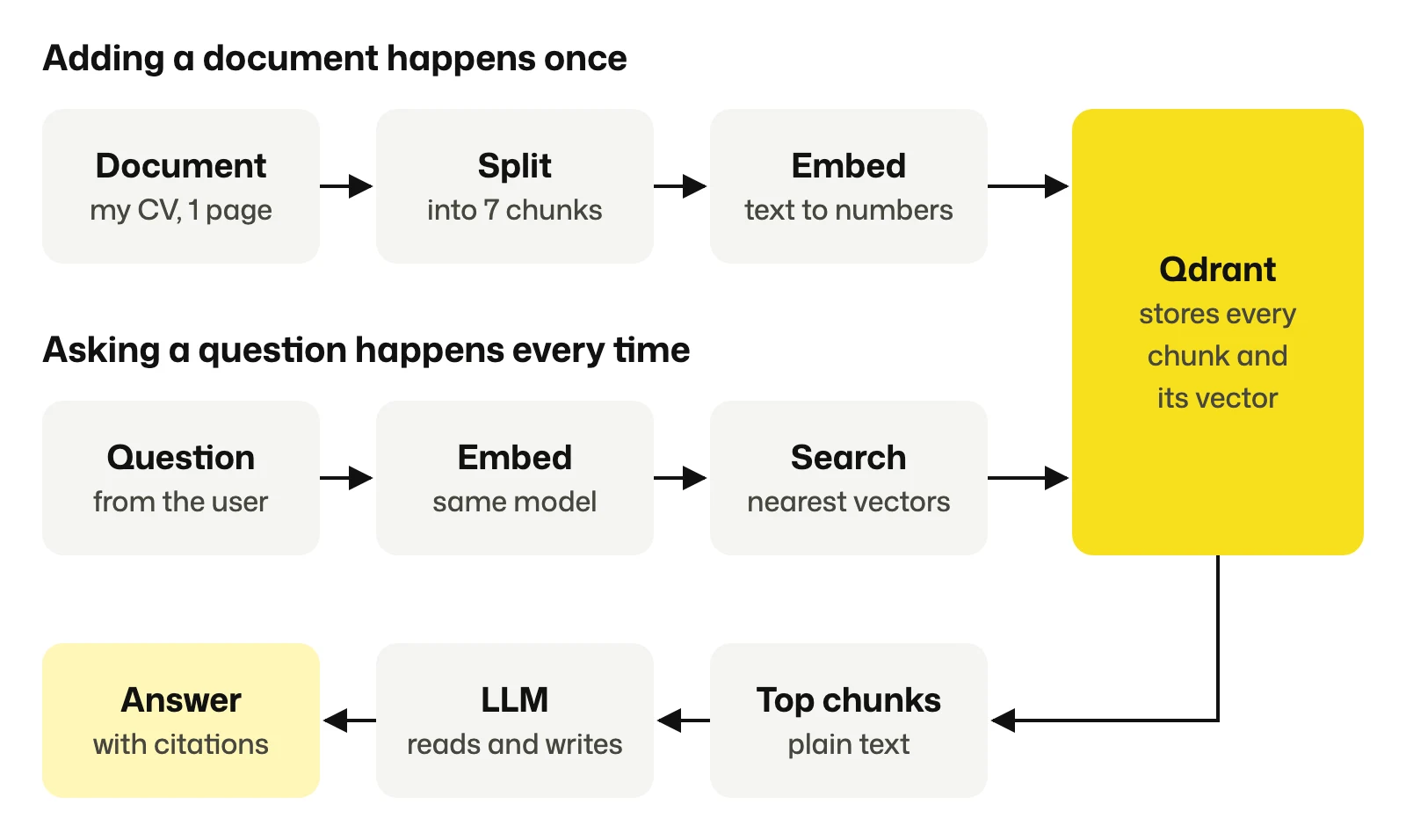
The top row runs once per document. The bottom two rows run on every question. Qdrant sits in the middle, and it's the only thing the two jobs share.
One thing I had backwards at first: the question gets turned into a vector, but it's never stored. That vector is only used for one search and then thrown away.
Chunking: cut the document into cards
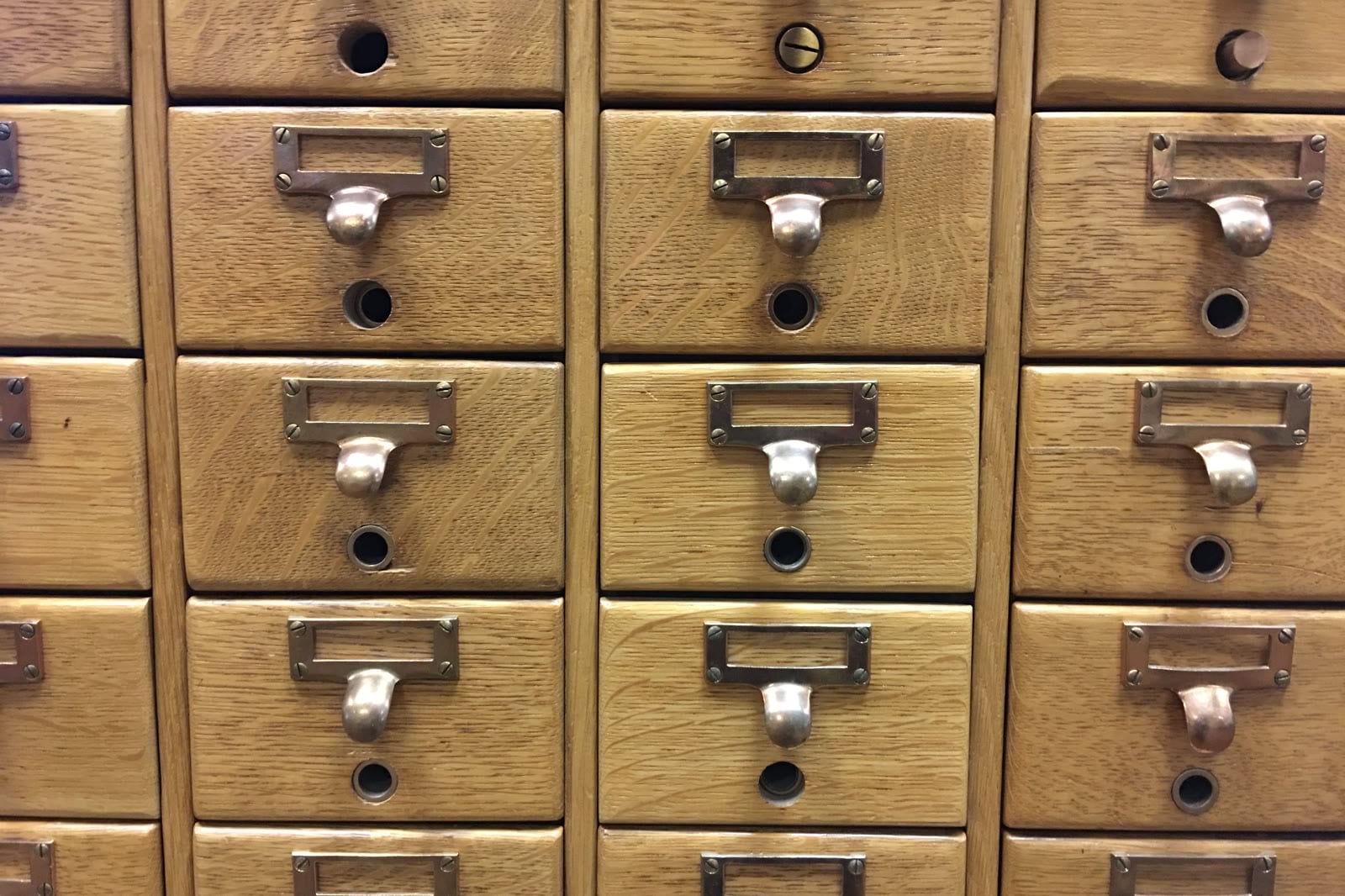
My first version stored the CV as one page, so one vector. It worked, but every search returned the whole CV, because that was the only thing in there. It's like asking a librarian for one fact and getting the whole shelf.
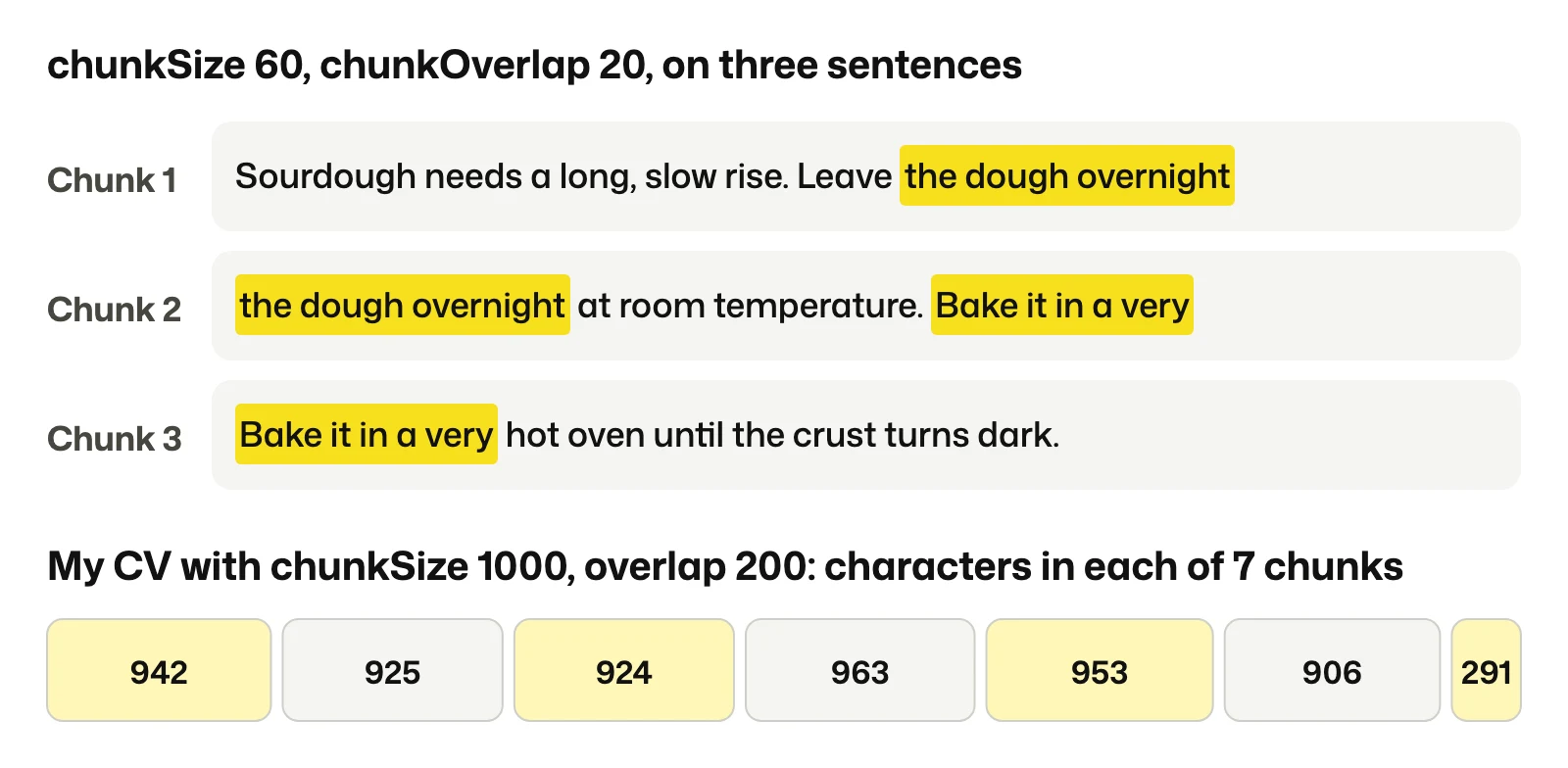
Chunking means cutting the text into smaller pieces. I used a chunk size of 1,000 characters with an overlap of 200, which turned my page of 4,982 characters into 7 chunks.
The overlap is the part that looks odd until you see it. If a cut lands in the middle of a thought, each chunk would hold only half of it. So the end of one chunk repeats at the start of the next. Here's real output from the splitter, with the size turned right down so you can see it:
Does it actually help? I measured it. I embedded two questions and compared each one against the whole page and against the best chunk. A higher score means a closer match:
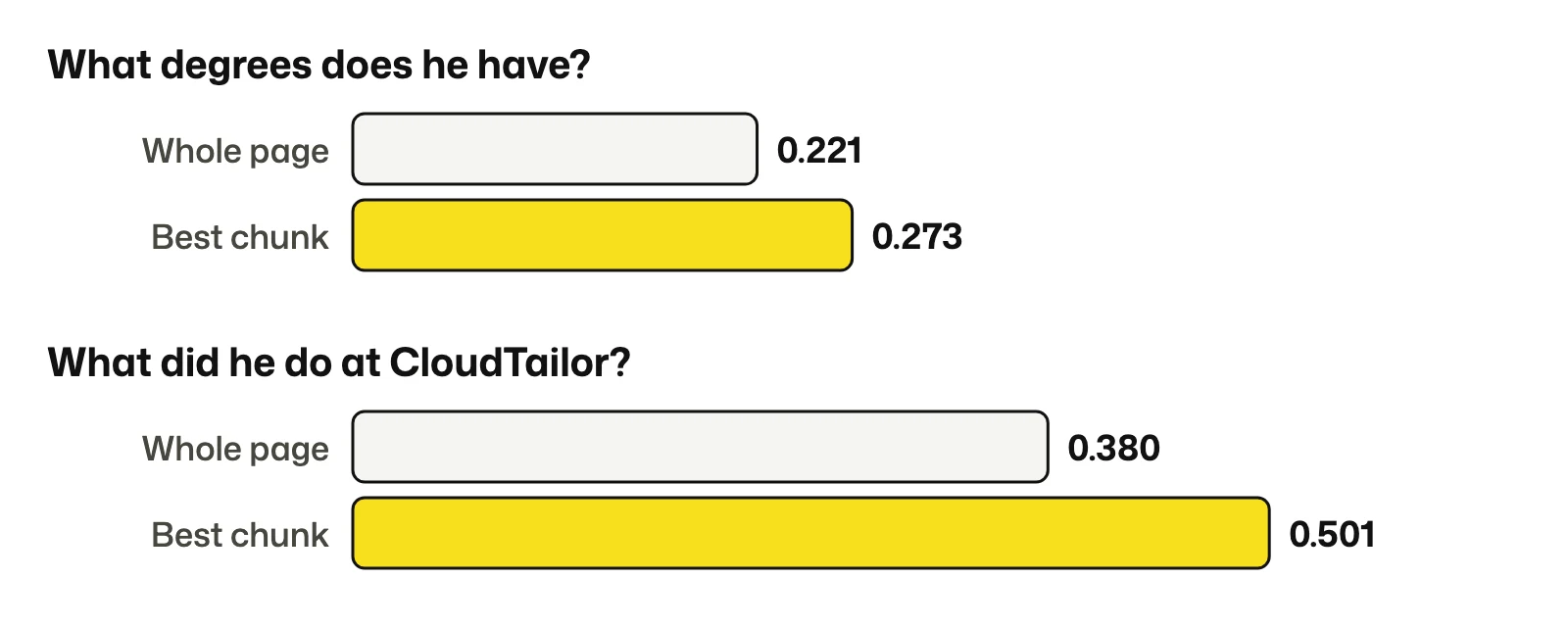
The whole page is a blend of everything I've done, so it's a weak match for any one question. The education chunk is about one thing, so it wins.
Embedding: turn meaning into a location
Computers can't compare meaning, but they can compare numbers. An embedding model reads a piece of text and returns a list of numbers. Mine, text-embedding-3-small, returns 1,536 of them. That list is called a vector, and you can think of it as an address on a map of meaning. Texts about similar things get nearby addresses.
Nobody can picture 1,536 dimensions, so I took 12 sentences about food, money and code, embedded them for real, and used PCA to squash them down to 2 dimensions. Then I embedded a question, "Why did my bread not rise?", and put it on the same map:
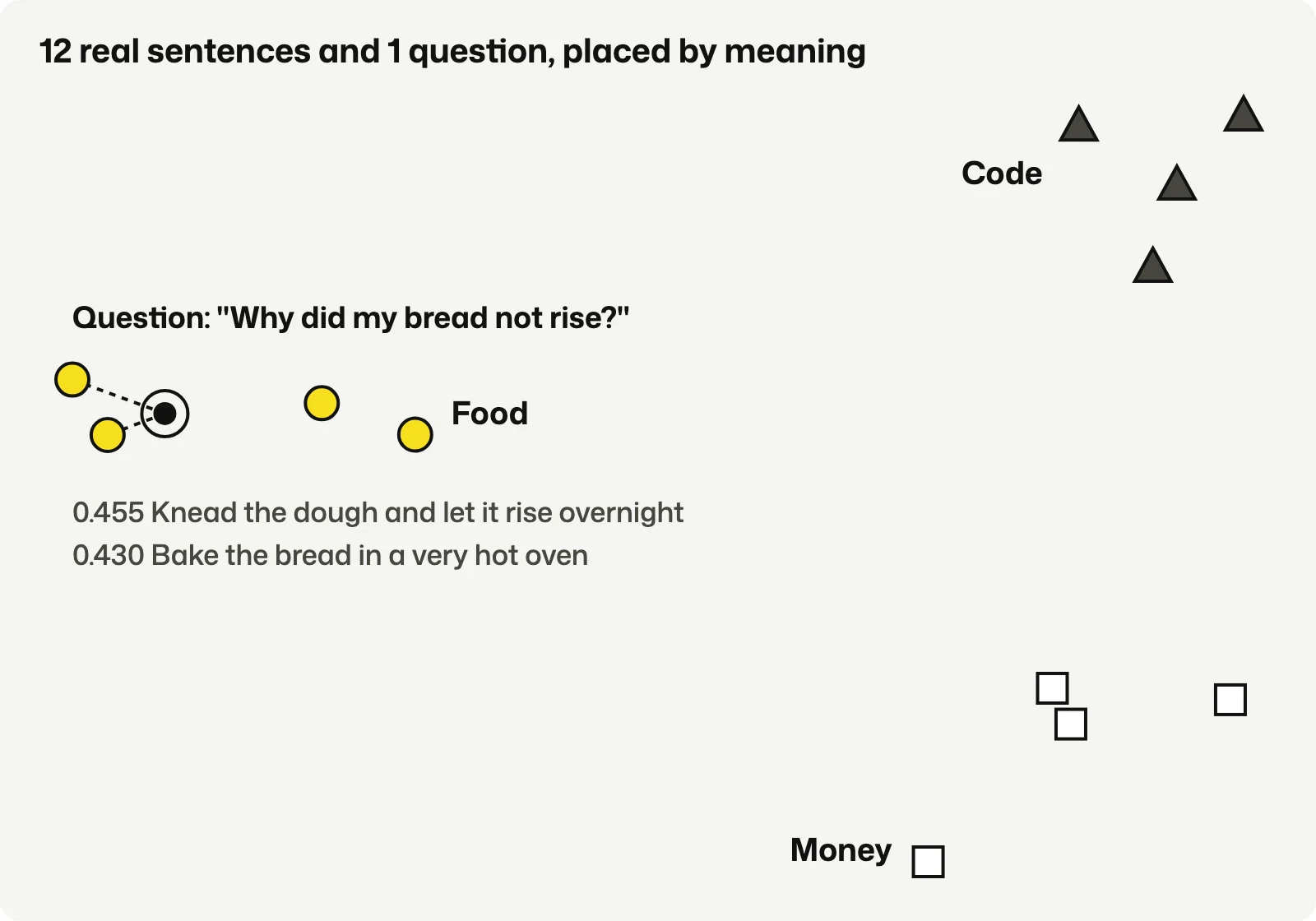
Nobody told the model these are three topics. The groups came out of the numbers.
Look at the top match too. "Knead the dough and let it rise overnight" scored highest, and it shares the word "rise" with the question, but "Bake the bread in a very hot oven" came second with no shared word except "bread". This is the difference from keyword search. Search by meaning finds "dough" when you asked about "bread".
The score is cosine similarity, which measures whether two vectors point in the same direction. A score of 1 means the same direction, and around 0 means unrelated. The food sentences scored up to 0.455 against my question, while the code sentences scored between 0.06 and 0.17.
One rule you can't break: the question has to use the same embedding model as the documents. Each model draws its own map, so a location from one means nothing on another.
LangChain: the adapters
LangChain confused me until I saw what it isn't. It isn't a model and it isn't a database. It holds no knowledge of its own. It's a JavaScript and Python library of adapters that gives every RAG step the same shape, a bit like Lego studs on pieces from different boxes.
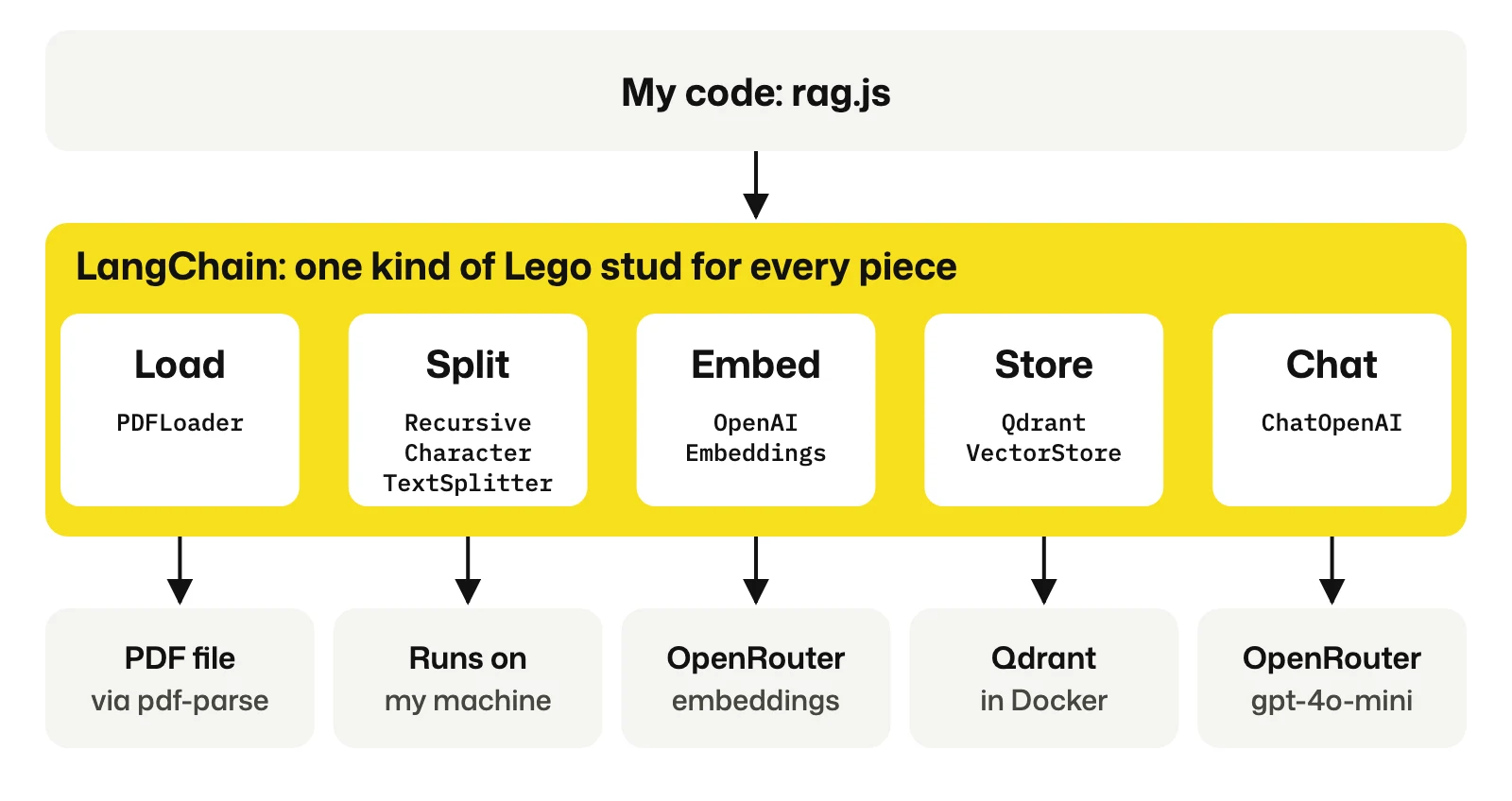
This is nearly the whole indexing script:
const pages = await new PDFLoader("Kishan_Kanejiya_CV.pdf").load();

const splitter = new RecursiveCharacterTextSplitter({ chunkSize: 1000, chunkOverlap: 200 });
const chunks = await splitter.splitDocuments(pages);

await QdrantVectorStore.fromDocuments(chunks, embeddings, {
  url: "http://localhost:6333",
  collectionName: "kishan-cv",
});
Without it I'd write my own PDF parsing, my own splitter, and my own HTTP calls to the embedding API and to Qdrant. All of that is doable, and it's worth doing once to learn it.
The adapter idea paid off quickly. I had no OpenAI key, so I pointed the embeddings at OpenRouter instead. The class is still called OpenAIEmbeddings, because OpenRouter speaks the same API format:
const embeddings = new OpenAIEmbeddings({
  model: "openai/text-embedding-3-small",
  apiKey: process.env.OPENROUTER_API_KEY,
  configuration: { baseURL: "https://openrouter.ai/api/v1" },
});
Nothing else in the code changed. PDFLoader was the one part I couldn't find by searching, because it has no package of its own. It lives inside @langchain/community, and it needs pdf-parse installed next to it.
Qdrant: a database that searches by nearness
A normal database is good at "find the row where id is 5". It has no idea how to answer "find the 5 rows closest to this list of 1,536 numbers". A vector database is built for exactly that question, and Qdrant is an open source one written in Rust. Setting it up took one small file:
services:
  qdrant:
    image: qdrant/qdrant
    container_name: qdrant
    ports:
      - "6333:6333"
Run docker compose up -d and you get the database plus a dashboard at localhost:6333/dashboard. A collection is like a table, and each row is called a point. A point has three parts:
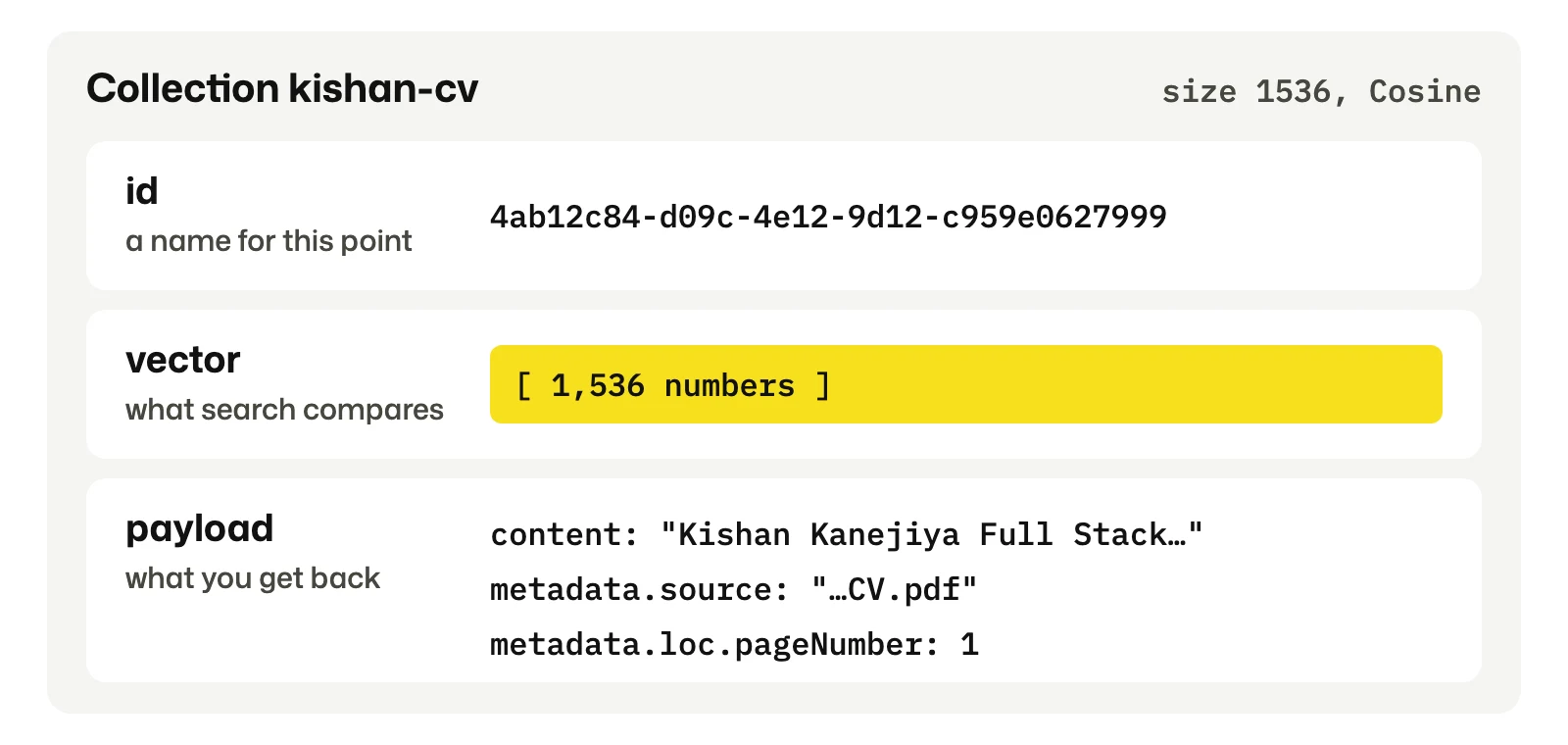
The vector is what gets searched, and the payload is what comes back. That split is why the search can work on numbers while your code still gets readable text.
How it searches: a graph, not a list
The simple way to search is to compare your question against every single vector. That's fine for a few thousand points, and it gets slow at millions. So Qdrant builds a graph called HNSW, which stands for Hierarchical Navigable Small World. Each point links to its nearby points, and the links are stacked in layers.
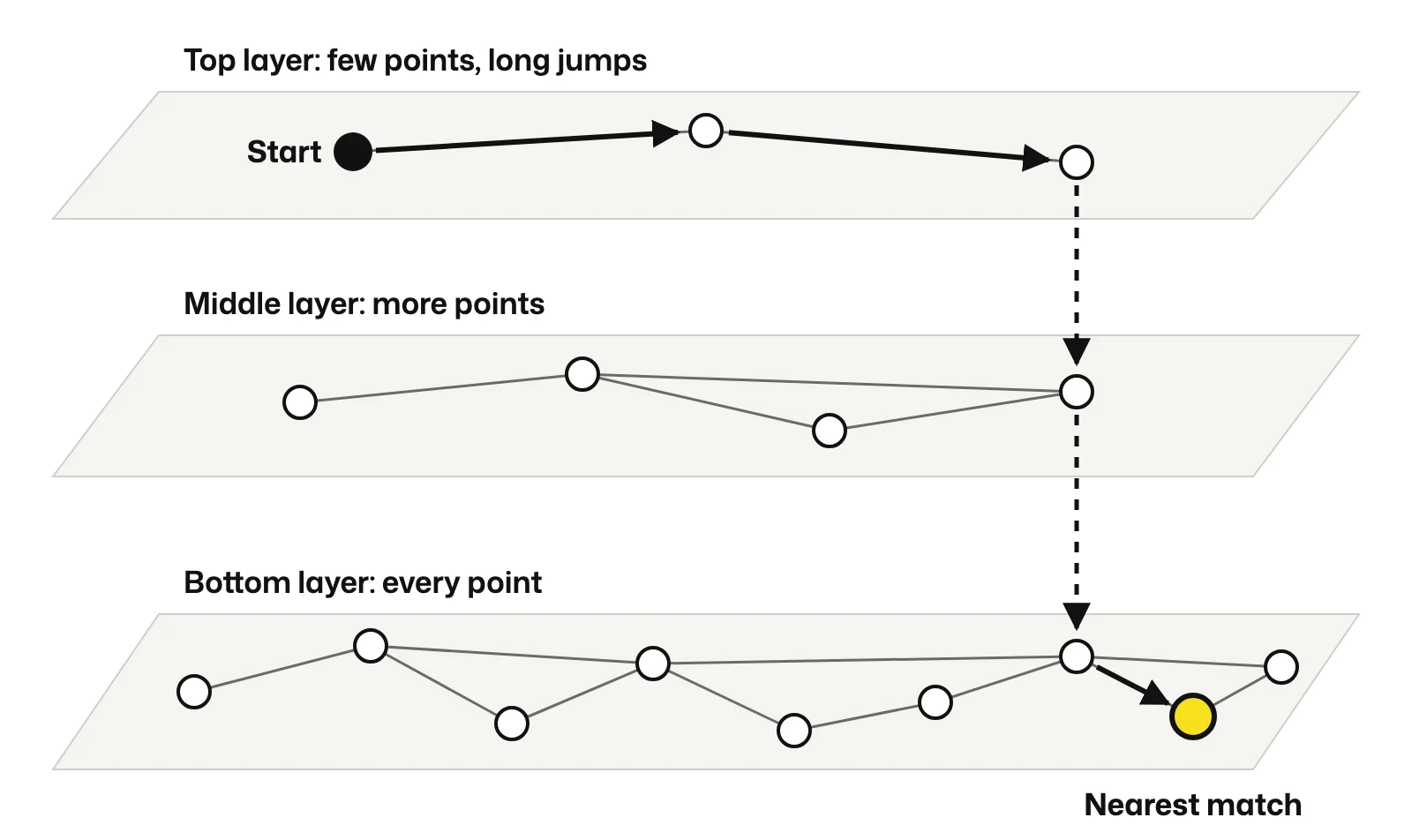
It works like finding a street in another country. You don't check every street on earth. You take a long jump to the right city, drop down to the right area, then walk the last few steps. The trade-off is that the result is approximate: it's extremely likely to be the nearest match, but not guaranteed.
My own collections are too small to use this. The default indexing threshold on my install is 10,000 KB, so below that Qdrant just compares every vector, and that's the fastest option at this size anyway. I noticed this when the collection showed indexed_vectors_count: 0 and I thought something was broken.
Why I picked Qdrant
To be honest, 7 chunks don't need a vector database. A JavaScript array and a cosine function would do the job. I used Qdrant because the data had to survive a restart, it runs from one Docker command, and the dashboard let me look at what was actually stored while I was learning. Payload filters turned out to be useful too: removing a source in my app is one delete, filtered on metadata.sourceId.
If I already had Postgres in a project I'd look at pgvector first. A separate database is one more thing to run.
The mistakes
These are the ones worth writing down.
npm install failed with ERESOLVE. Installing @langchain/community and @langchain/core by name made npm settle on an old core version, because of an optional dependency. Adding @latest to both fixed it, and I didn't need --force. Later dotenv@18 caused another conflict with a peer of the community package, and dotenv@16 solved that.
I thought nothing was being stored. The dashboard showed one dot, and the text stopped at Typ.... Both were fine. One page makes one point, and the panel only previews long text. The full 4,982 characters were there when I read the point through the API.
Running the script twice stored everything twice. Each run makes new random ids, so the same page ends up in the collection again, and search returns it twice. In the app I fixed this by hashing the content to make a source id, so the same text can't be added twice.
Follow-up questions found nothing. "What about the budget?" means nothing to a vector search. So when there's chat history, I ask the model to rewrite the question into a full one first, and search with that.
My data lives inside the container. There's no volume in that compose file, so docker compose down deletes it. For anything you want to keep, add ./qdrant_storage:/qdrant/storage under volumes.
What I'd tell myself this morning
RAG doesn't teach the model anything. The model forgets it all after each answer. Your code finds a few relevant paragraphs and pastes them into the prompt, with an instruction to answer only from them. That's why my app can say a fact isn't in the sources instead of inventing one.
If you want to try it, start with one PDF and print the chunks before you do anything else. Looking at what the model will actually receive taught me more than any diagram.
First published on my blog. Cover photo: MarkBuckawicki, CC0, via Wikimedia Commons (source).
About the author
- Full stack engineer in London with 5+ years on production web platforms. I lead AI-assisted modernisation at Xanda: React and Go for the UK energy market, a government claims portal, and moving old Java and C++ systems onto the cloud. Outside work I run a small home server behind a Cloudflare Tunnel with a handful of public tools on it: Doorstep (rental alerts across Rightmove, OnTheMarket and OpenRent), SeenSooner (NHS A&E and planned-care waits), GridPulse (live GB grid carbon), Sift (LLM ticket triage that survives model failures) and AI Radar (a news digest written hourly by an n8n workflow). I write here about React and Next.js upgrades, Node, coding with AI agents, and the CVEs I've had to patch. Originals live at blogs.kishankanejiiya.tech.
Comments
Join the discussionNo comments yet. Be the first to comment.